
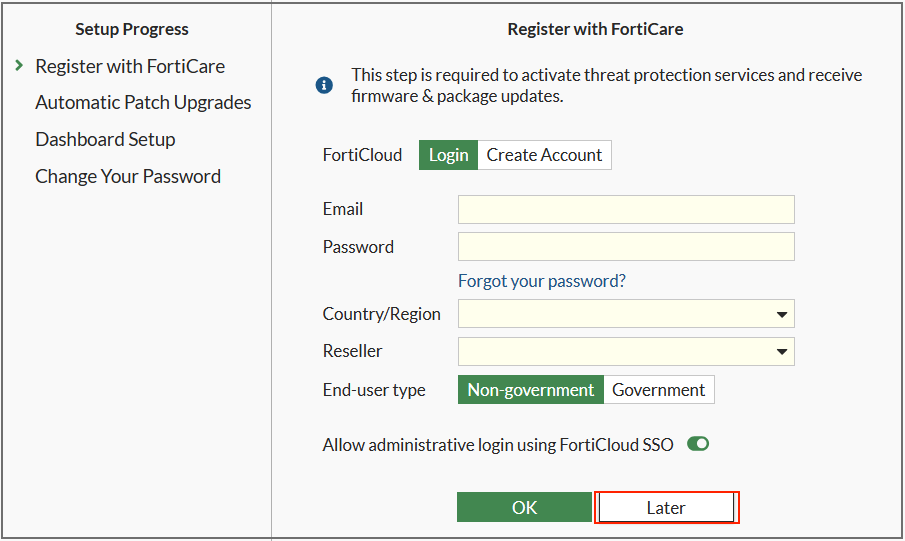
새로운 FortiGate 설치 시 FortiOS GUI에 처음 로그인하면 FortiCare 강제 등록 화면이 표시된다.
| 펌웨어 버전 | 적용 모델 |
| v7.2.11 | • FortiGate 200G, 201G • FortiGate 900G, 901G |
| v7.4.8 | |
| v7.4.9 | FortiGate: • FG-50G • FG-51G • FG-50G-SFP-POE • FG-51G-SFP-POE • FG-50G-DSL • FG-50G-5G • FG-51G-5G • FG-50G-SFP • FG-70G • FG-71G • FG-71G-POE • FG-70G-POE-5G • FG-70G-POE • FG-90G • FG-91G • FG-120G • FG-121G • FG-200G • FG-201G • FG-700G • FG-701G • FG-900G • FG-901G FortiWiFi: • FWF-50G • FWF-51G • FWF-50G-DSL • FWF-50G-5G • FWF-51G-5G • FWF-50G-SFP • FWF-70G • FWF-71G • FWF-70G-POE FortiGate Rugged: • FGR-50G-5G • FGR-70G • FGR-70G-5G-DUAL |
GUI에서 표시되는 등록화면을 우회 하려면, BIOS에서 Security Level을 1로 변경해야 한다.(default 2)
콘솔을 연결하고 BIOS 메뉴에서 아래와 같이 "System configuration and information" 를 선택한다.
| [C]: Configure TFTP parameters. [R]: Review TFTP parameters. [T]: Initiate TFTP firmware transfer. [F]: Format boot device. [B]: Boot with backup firmware and set as default. [I]: System configuration and information. [Q]: Quit menu and continue to boot. [H]: Display this list of options. |
Set security level 선택
| Enter C,R,T,F,B,I,Q,or H: [S]: Set serial port baudrate (will take effect on next boot). [R]: Set restricted mode. [T]: Set menu timeout. [U]: Set security level. [C]: Set FortiCare registration. [I]: Display system information. [E]: Reset system configuration. [M]: Display SPD information. [Q]: Quit menu and continue to boot. [H]: Display this list of options. |
1을 입력해서 "Not Enforce"를 선택.
| Enter S,R,T,U,C,I,E,M,Q,or H: [1]: Not Enforce [2]: Enforce Enter FortiCare registration setting [2]: 1 |
이렇게 BIOS의 Security Level을 변경하고 부팅하면, 아래와 같이 FortiCare 등록을 우회할 수 있다.
'FortiGate > Firmware Issue' 카테고리의 다른 글
| “FortiCloud SSO Login Authentication Bypass” 취약점 (0) | 2025.12.10 |
|---|---|
| NP7 모델에서 Session Timeout 버그 발생 (0) | 2025.12.10 |
| v7.6.4 : GUI 로그인이 안되는 현상 ('Authentication failure') (0) | 2025.11.24 |
| v7.6.4 : FortiGate 4xF/6xF 시리즈의 IPsec 트래픽이 간헐적으로 중단되는 현상 (0) | 2025.11.24 |
| v7.6.4 : 업그레이드 후 SNMP crash 발생 (0) | 2025.10.21 |
댓글